概览
下表列出了用于向 Gantt 图填充数据的最重要模型类。
| 类 | 说明 |
|---|---|
| Activity | Activity 表示将在 Gantt 图控件的图形视图中显示在时间轴下方的对象。Activity 可以添加到某个 Row 上的特定 Layer。 |
| ActivityRef | Activity 引用用于精确标识 Activity 的位置,该位置由 Row、Layer 和 Activity 本身组合而成。 |
| ActivityLink | Activity 链接可用于表示两个 Activity 之间的依赖关系。 |
| ActivityRepository | Activity 仓库供 Row 用来存储和查找 Activity。 |
| Row | Row(模型)对象用于存储 Gantt 图中某个(可视)行上的 Activity。 |
| Layer | Layer 用于创建 Activity 分组。 |
| LinesManager | LinesManager 用于控制 Row 内部(内嵌)行的布局。 |
| Layout | 每个 Row 以及 Row 的每条内部行都关联一个 Layout。Layout 会影响 Activity 渲染和编辑过程中的多个方面。此外,用于绘制 Row 背景的若干系统 Layer 也会使用这些 Layout 信息。 |
| Calendar | Calendar 是 Activity 仓库的扩展,并增加了名称和可见性属性。 |
Activity(活动)
Activity 表示将在 Gantt 图控件的图形视图中显示在时间轴下方的对象。
可以通过调用 Row.addActivity(Layer, Activity),将 Activity 添加到 Row 上的特定 Layer。
Activity 类型
以下是可以添加到 Row 的不同 Activity 类型。
-
Activity- 基础实现:ActivityBaseBase- 最简单的 Activity 形式。- id (String)
- name (String)
- startTime (Instant)
- endTime (Instant)
-
ChartActivity- 基础实现:ChartActivityBaseBase- 此类型的 Activity 可显示在 ChartLayout 布局中。 - id (String)
- name (String)
- startTime (Instant)
- endTime (Instant)
-
chartValue (double)
-
CompletableActivity- 基础实现:CompletableActivityBase- 此类型的 Activity 带有百分比值(完成度)。 - id (String)
- name (String)
- startTime (Instant)
- endTime (Instant)
-
percentageComplete (double)
-
HighLowChartActivity- 基础实现:HighLowChartActivityBase- 此类型的 Activity 可显示在 ChartLayout 布局中。 - id (String)
- name (String)
- startTime (Instant)
- endTime (Instant)
- high (double)
-
low (double)
-
MutableActivity- 基础实现:MutableActivityBase- 最简单的可变 Activity 形式。用户可以更改这些 Activity 的开始时间和结束时间。 - id (String)
- name (String)
- startTime (Instant)
-
endTime (Instant)
-
MutableChartActivity- 基础实现:MutableChartActivityBase- 这些 Activity 可显示在 ChartLayout 布局中。用户可以更改这些 Activity 的开始时间、结束时间和图表值。 - id (String)
- name (String)
- startTime (Instant)
- endTime (Instant)
-
chartValue (double)
-
MutableCompletableActivity- 基础实现:MutableCompletableActivityBase- 这些 Activity 带有百分比值(完成度)。用户可以更改这些 Activity 的开始时间、结束时间和完成百分比值。 - id (String)
- name (String)
- startTime (Instant)
- endTime (Instant)
-
percentageComplete (double)
-
MutableHighLowChartActivity- 基础实现:MutableHighLowChartActivityBase- 这些 Activity 可显示在 ChartLayout 布局中。用户可以更改这些 Activity 的开始时间、结束时间以及高值和低值。 - id (String)
- name (String)
- startTime (Instant)
- endTime (Instant)
- high (double)
- low (double)
图表 Activity
图表 Activity 是 Activity 的附加接口。希望参与 ChartLayout 的 Activity 需要实现该接口。 该接口会为 Activity 添加一个图表值。下图展示了 ChartLayout 布局每天布置一个图表 Activity 的示例。

可完成 Activity
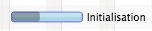
可完成 Activity 是一种带有 0 到 100% 之间“完成百分比”值的 Activity。可完成 Activity 使用“可完成 Activity 条渲染器”绘制。该渲染器会根据完成百分比值绘制 Activity 的背景。下图展示了一个示例。
高低值图表 Activity
高低值图表 Activity 带有两个额外属性:high 和 low。ChartLayout 使用这些值来正确定位它们。高低值 Activity 的一个典型用例是蜡烛图(例如股票开盘价/最高价/最低价/收盘价)。
Activity 引用
Activity 引用用于精确标识 Activity 的“位置”。位置由 Row、Layer 和 Activity 本身组合而成。由于同一个 Activity 可能同时位于多个 Row 和/或多个 Layer 上,因此通常需要使用 Activity 引用,而不仅仅是 Activity 本身。可以把 Activity 引用理解为通向该 Activity 的“路径”。
Activity 链接
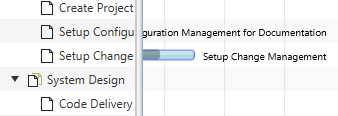
Activity 链接可用于建模两个 Activity 之间的任意依赖关系。在项目计划应用中,链接会表示两个任务之间的前置/后续关系。例如,“任务 A 必须完成后,任务 B 才能开始”。在其他领域,链接也可能仅表示两个或多个 Activity 需要一起调度,并且移动其中一个时其他 Activity 也必须一起移动。下图展示了此类链接的示例。
可以通过调用 GanttChart.getLinks().add(myLink) 将链接添加到 Gantt 图。

Activity 仓库
Activity 仓库供 Row 用来存储和查找 Activity。默认情况下,每个 Row 都拥有一个
IntervalTreeActivityRepository。如果应用需要惰性加载策略,可以用自定义仓库替换这个默认仓库。
查询
任何仓库最重要的功能,都是能够查询给定时间区间内的 Activity。为此,ActivityRepository 接口定义了带有以下参数的 getActivities() 方法:
| 类型 | 名称 | 说明 |
|---|---|---|
| Layer | layer | 每当用户向左或向右滚动时,Row 都会多次查询仓库。每个 Layer 查询一次。 |
| Instant | startTime | Row 查询 Activity 的时间区间的开始时间。 |
| Instant | endTime | Row 查询 Activity 的时间区间的结束时间。 |
| TemporalUnit | unit | Dateline 当前显示的 主时间单位 的当前值。这是在 Dateline 底部显示的单位,例如天。该参数可用于控制结果的细粒度。如果我们知道用户当前查看的是月份,那么聚合每日 Activity 可能更有意义。 |
| ZomeId | zoneId | Row 显示的时区。 |
已使用的最早/最晚时间
每个仓库实现都需要能够回答已使用的最早和最晚时间(仓库中任意 Activity 的最早开始时间/最晚结束时间)是什么。这使 UI 能够提供便于导航的控件:“显示最早”、“显示最晚”。为此,仓库需要实现 getEarliestTimeUsed() 和 getLatestTimeUsed() 方法。
更新 Activity
Activity 在被修改之前,需要先从其仓库中移除(ActivityRef.detachFromRow()),修改完成后再添加回去(ActivityRef.attachToRow())。这是确保仓库的底层数据结构始终与 Activity 保持同步的唯一方式。例如:只有当所有节点都位于正确位置时,区间树数据结构才能正常工作。只有在节点修改前先将其从树中移除(否则树将无法找到它们),然后再以新值重新插入,才能保证这一点。
事件处理
Activity 仓库实现了监听器支持,因此当仓库内容发生变化时,UI 可以自行更新。相关方可以通过调用 addEventHandler() 附加处理器,或通过调用 removeEventHandler() 移除处理器。事件类名为 RepositoryEvent,它有三种事件类型:
ACTIVITY_ADDED- Activity 已添加到仓库。ACTIVITY_REMOVED- Activity 已从仓库移除。REPOSITORY_CHANGED- 某些内容已改变仓库的状态。
这些事件类型通常都会触发所属 Row 的重绘操作。
IntervalTreeActivityRepository
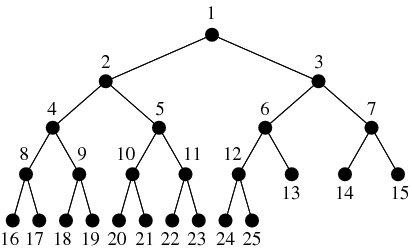
InteralTreeActivityRepository 是使用一个或多个二叉区间树数据结构来存储 Activity 的 Activity 仓库。
ListActivityRepository
ListActivityRepository 是使用一个或多个列表数据结构来存储 Activity 的 Activity 仓库。该仓库可以配置为从其查询方法返回不同类型的结果迭代器。可选值定义在 ListActivityRepository.IteratorType 中。
BINARY_ITERATOR- 返回一个迭代器,该迭代器通过二分查找来找到给定时间区间内要绘制的第一个 Activity。随后它会遍历所有后续 Activity,直到找到开始时间晚于给定时间区间的 Activity。LINEAR_ITERATOR- 返回一个迭代器,该迭代器通过线性查找来找到给定时间区间内要绘制的第一个 Activity。随后它会遍历所有后续 Activity,直到找到开始时间晚于给定时间区间的 Activity。SIMPLE_ITERATOR- 返回一个完全不执行任何查找的迭代器,而是立即开始返回 Activity,无论这些 Activity 当前是否位于 Gantt 图的可见时间区间内。
SIMPLE_ITERATOR 用于只有少量 Activity 的 Row。当我们希望确保即使 Activity 已经滚出可见区域,其尾随文本仍然显示时,这个迭代器非常有价值。
Row(行)
Row 对象用于存储 Gantt 图某一行上的 Activity。这些 Activity 不会直接存储在 Row 上,而是存储在 Activity 仓库 中。默认仓库类型为 IntervalTreeActivityRepository。Activity 可以放置在 Row 内部的行上。Row 将这项工作委托给 LinesManager。默认管理器类型为 EqualLinesManager。
类型参数与层级结构
定义 Row 需要三个类型参数。第一个定义父 Row 的类型,第二个定义子 Row 的类型,第三个定义该 Row 上显示的 Activity 类型。下面示例定义了一个 “Building”。该 Building 是 Factory 的一部分,Building 中包含 Machine。在表示该 Building 的 Row 中,我们显示 Shift。
public class Building extends Row<Factory, Machine, Shift> {
}
这样的模型允许我们在 Gantt 图中显示如下层级结构:
- Factory
- Building 1
- Building 2
- Building 3
- Machine A
- Machine B
- Machine B
- Building 4
- Machine C
- Machine D
属性
每个 Row 都有一组 observable 属性。
| 属性 | 类型 | 说明 |
|---|---|---|
| expanded | Boolean | 控制 Row 是否显示其子 Row。 |
| height | double | Row 的当前高度。 |
| minHeight | double | Row 的最小高度。 |
| maxHeight | double | Row 的最大高度。 |
| layout | Layout | Row 使用的 Layout。默认值为 GanttLayout。 |
| lineCount | int | Row 内要显示的内部行数量。 |
| linesManager | Lines 管理器 | 用于控制各行及其位置、高度和 Activity 放置方式的 Lines 管理器。 |
| name | String | Row 的名称,例如“Machine 1”、“Building 1”。 |
| parent | Row | 父 Row。这是一个只读属性,由内部管理,并在某个 Row 被添加到另一个 Row 的子列表时更新。 |
| repository | Activity 仓库 | Row 用来存储 Activity 的仓库。 |
| showing | boolean | 用于表示该 Row 当前正在 UI 中显示的标志。此信息可用于优化惰性加载策略。 |
| userObject | Object | 可选的用户对象。用于建立通向业务模型的桥梁。 |
| zoneId | ZoneId | Row 表示的时区。每个 Row 都可以位于自己的时区。 |
Layer(层)
Layer 用于将 Activity 分组。同一 Layer 上的 Activity 会同时绘制(z-order)。Layer 具有名称和 ID,可以开启/关闭,也可以更改其不透明度。这些更改会影响该 Layer 上的所有 Activity。Layer 的 ID 用于在不同 Gantt 图之间拖放 Activity。被放下的 Activity 会添加到具有相同 ID 的 Layer。Layer 名称将用作新建 Layer 的默认 ID。只有当同一种 Layer 类型在不同 Gantt 图中使用不同名称时,才需要更改 ID。
Lines 管理器
该管理器用于控制 Row 内各行的布局。位于不同行上的 Activity 不会相互重叠,除非这些行本身相互重叠。每条行都可以有自己的高度以及在 Row 内的位置。每条行也可以有自己的 Layout。通过使用行和 Layout,可以用不同方式显示属于同一个 Row 的 Activity(参见 ChartLayout、AgendaLayout、GanttLayout)。
行数
Row 上的实际行数存储在 Row 的 lineCount 属性中。只需调用 Row.setLineCount(int) 即可更改其值。如果行数大于零,Row 会回调其 Lines 管理器,以确定每条行的位置、高度以及每个 Activity 放置在哪一行。同时,每条行要使用的 Layout 类型也会从管理器获取。
接口
下表列出了 LineManager 的接口方法。
| 方法 | 说明 |
|---|---|
| double getLineHeight(int lineIndex, double rowHeight); | 返回给定索引处行的高度。该高度可以基于给定的可用 Row 高度即时计算。 |
| int getLineIndex(A activity); | 返回给定 Activity 的行索引。该方法将 Activity 放置到不同的行上。 |
| Layout getLineLayout(int lineIndex); | 返回具有给定行索引的行的 Layout。每条行都可以有自己的 Layout。 |
| double getLineLocation(int lineIndex, double rowHeight); | 返回给定索引处行的位置。该位置可以基于给定的可用 Row 高度即时计算。 |
Equal Lines 管理器
EqualLinesManager 可用于在 Row 上均匀分布各行的位置和高度。每条行具有相同高度,并且各行不会相互重叠。虽然管理器会提供这种行为,但应用仍然负责将 Activity 放置到不同行上,并为每条行指定 Layout。这也是为什么 getLineHeight() 和 getLineLocation() 方法是 final,而 getLineLayout() 和 getLineIndex() 方法不是 final 且可以被重写。
Auto Lines 管理器
AutoLinesManager 可用于根据仓库内的所有 Activity 动态创建行数。该 Lines 管理器会检测相交 Activity(开始/结束时间区间)的簇,并确保有足够的行可以以不重叠的方式放置这些 Activity。下面给出该管理器类的完整源代码作为案例研究。请注意,管理器的 layout() 方法需要从外部调用。一个好的做法是监听 ACTIVITY_CHANGE_FINISHED 事件,或者粒度更细的 START/END_TIME_CHANGE_FINISHED 事件。
/**
 * Copyright (C) 2026 Dirk Lemmermann Software & Consulting (dlsc.com)
 *
 * This file is part of FlexGanttFX.
 */
package com.flexganttfx.view.util;
import static java.util.Objects.requireNonNull;
import impl.com.flexganttfx.skin.util.Placement;
import impl.com.flexganttfx.skin.util.Resolver;
import java.time.Instant;
import java.util.ArrayList;
import java.util.Iterator;
import java.util.List;
import java.util.Map;
import com.flexganttfx.model.Activity;
import com.flexganttfx.model.ActivityRepository;
import com.flexganttfx.model.Layer;
import com.flexganttfx.model.LinesManager;
import com.flexganttfx.model.Row;
import com.flexganttfx.model.layout.EqualLinesManager;
import com.flexganttfx.view.graphics.GraphicsBase;

/**
 * A specialized {@link LinesManager} used for ensuring that activities will not
 * overlap each other. This manager will create as many inner lines as needed
 * and will calculate the placement of all activities on these lines.
 *
 * @param <R>
 *            the type of the row that will be managed
 * @param <A>
 *            the type of the activities that will be managed
 *
 * @since 1.2
 */
public class AutoLinesManager<R extends Row<?, ?, A>, A extends Activity>
        extends EqualLinesManager<R, A> {

    private Map<A, Placement<A>> placements;
    private GraphicsBase<R> graphics;

    /**
     * Constructs a new automatic lines manager. The constructor requires a
     * reference to the graphics view to look up various parameters that are
     * needed when the manager queries the activity repository of the row (e.g.
     * the currently displayed temporal unit and the list of layers).
     *
     * @param row
     *            the managed row
     * @param graphics
     *            the graphics view where the manager will be used
     *
     * @since 1.2
     */
    public AutoLinesManager(R row, GraphicsBase<R> graphics) {
        super(row);
        this.graphics = requireNonNull(graphics);
        layout();
    }

    /**
     * Returns the graphics view where the manager will be used.
     *
     * @return the graphics view
     * @since 1.2
     */
    public final GraphicsBase<R> getGraphics() {
        return graphics;
    }

    public final void layout() {
        R row = getRow();
        ActivityRepository<A> repository = row.getRepository();
        Instant st = repository.getEarliestTimeUsed();
        Instant et = repository.getLatestTimeUsed();
        if (st == null || et == null) {
            return;
        }
        List<A> allActivities = new ArrayList<>();
        for (Layer layer : graphics.getLayers()) {
            Iterator<A> activities = repository.getActivities(layer, st, et,
                    graphics.getTimeline().getDateline()
                            .getPrimaryTemporalUnit(), row.getZoneId());
            if (activities != null) {
                activities.forEachRemaining(activity -> allActivities
                        .add(activity));
            }
        }
        placements = Resolver.resolve(allActivities);
        if (placements != null && !placements.isEmpty()) {
            Placement<A> p = placements.values().iterator().next();
            row.setLineCount(p.getColumnCount());
        } else {
            row.setLineCount(0);
        }
    }

    @Override
    public int getLineIndex(A activity) {
        if (placements != null) {
            Placement<A> placement = placements.get(activity);
            if (placement != null) {
                return placement.getColumnIndex();
            }
        }
        return -1;
    }
}
Layout 类型
每个 Row 以及 Row 的每条内部行都关联一个 Layout。Layout 会影响 Activity 渲染和编辑过程中的多个方面。此外,用于绘制 Row 背景的若干系统 Layer 也会使用这些 Layout 信息。可以通过调用 Row.setLayout(Layout) 设置 Layout;使用内部行时,也可以通过 Row 的 Lines 管理器返回 Layout。
FlexGanttFX 包含三种 Layout 类型。
| 布局 | 说明 |
|---|---|
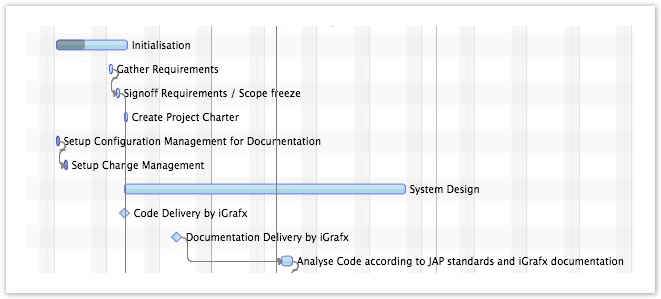
| GanttLayout | 沿时间轴水平布置 Activity。位置基于 Activity 的开始时间和结束时间。 |
| AgendaLayout | 沿“本地时间”刻度(0–24 小时)垂直布置 Activity。这会让 Activity 看起来像日历条目。 |
| ChartLayout | 将 Activity 布置为图表值。Activity 可以实现 ChartActivity 或 HighLowChartActivity 接口。 |
内边距
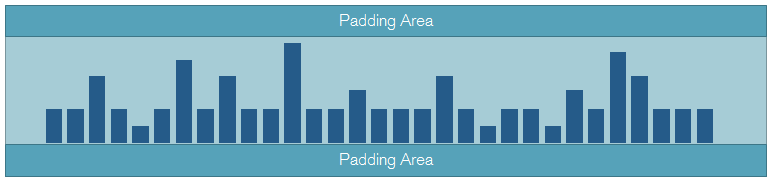
所有 Layout 类型都有一个 padding 属性。它用于在每个 Row/行的顶部和底部创建视觉间距。
Gantt 布局
Agenda 布局
AgendaLayout 类用于以类似常规日历的样式布置 Activity,其中垂直刻度显示小时。Activity 用于表示给定日期的预约。显示在 AgendaLayout 中的 Activity 可能会被渲染多次。例如,当某个 Activity 跨越多天时就是这种情况。
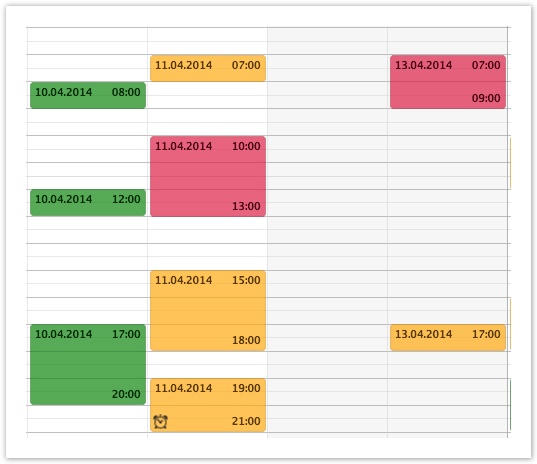
AgendaLayout 类允许指定开始时间和结束时间。这用于限制显示以及布置 Agenda Activity 的时间区间。在大多数情况下,显示完整 24 小时没有意义,只显示工作时间即可,例如上午 8 点到下午 6 点。只需调用 AgendaLayout.setStartTime() 或 setEndTime() 即可更改时间范围。
冲突策略
AgendaLayout 中的 Activity 可能会相互交叉。conflictStrategy 属性允许你决定如何处理这些情况。下表显示了可选值。
| 策略 | 说明 |
|---|---|
| OVERLAPPING | 相互冲突的日程条目会彼此叠放绘制,但其中一个会缩进几个像素。缩进量可以通过 AgendaLayout 上的 overlapOffset 属性控制。 |
| PARALLEL | 相互冲突的日程条目会显示在同一天内的不同列中。 |
Chart 布局
使用 ChartLayout 类会使 Activity 以图表柱的形式布置。例如,一系列这样的柱可以用于形成容量曲线。ChartActivity 类型的 Activity 会放置在 Layout 最小值和最大值之间的零线处。图表 Activity 的高度基于 ChartActivity.getChartValue() 返回的值。HighLowChartActivity 类型的 Activity 会显示为浮动柱。该 Layout 还支持定义绘制在 Row 背景中的次要和主要图表线。
最小值与最大值 – ChartLayout 布局提供两个属性,用于控制图表 Activity 的实际布局:minValue 和 maxValue。这些值必须由应用管理,而不是由框架管理。可以通过调用 ChartLayout.setMinValue() 或 ChartLayout.setMaxValue() 设置它们。
主刻度与次刻度 – 每个 ChartLayout 布局实例都提供主刻度和次刻度列表。可以向这些列表添加值,以便在 Row 背景中渲染数值线。示例:最小值等于 0,最大值等于 100。此时为 50 和 100 定义主刻度是合理的。次刻度可以位于 10、20、30、40、60、70、80 和 90。
Calendar(日历)
Calendar 是 Activity 仓库的扩展,并增加了名称和可见性属性。Calendar
可以添加到整个 Gantt 图,也可以添加到 Gantt 图内的单个 Row。此外,Dateline 也会使用它们。
Dateline.getCalendars();
GraphicsBase.getCalendars();
Row.getCalendars();
Calendar 用于 Row 的背景。它们可以标记周末或节假日等内容。Calendar 信息始终以只读方式显示。Calendar 返回的 Activity 必须是 CalendarActivity 类型。用户无法以交互方式编辑它们。
Weekend Calendar
FlexGanttFX 已经包含一种预定义的 Calendar 类型。它名为 WeekendCalendar,用于标记周末日期(例如星期六、星期日)。

以下清单显示了该 Calendar 类的完整代码。它可以作为你自己的 Calendar 的基础。
/**
 * Copyright (C) 2014 Dirk Lemmermann Software & Consulting (dlsc.com)
 * This file is part of FlexGanttFX.
 */
package com.flexganttfx.model.calendar;
import static java.time.temporal.ChronoUnit.DAYS;
import static java.util.Objects.requireNonNull;
import java.time.DayOfWeek;
import java.time.Instant;
import java.time.ZoneId;
import java.time.ZonedDateTime;
import java.time.temporal.ChronoUnit;
import java.time.temporal.TemporalUnit;
import java.util.ArrayList;
import java.util.Arrays;
import java.util.Collections;
import java.util.EnumSet;
import java.util.Iterator;
import java.util.List;

import javafx.event.Event;

import com.flexganttfx.model.Layer;
import com.flexganttfx.model.repository.RepositoryEvent;
/**
 * A calendar specialized on returning activities that represent weekend days
 * (default: Saturday, Sunday). The days that are considered weekend days can be
 * configured by calling {@link #setWeekendDays(DayOfWeek...)}.
 *
 * @since 1.0
 */
public class WeekendCalendar extends CalendarBase<WeekendCalendarActivity> {

    private Instant lastStartTime = Instant.MIN;
    private Instant lastEndTime = Instant.MAX;
    private ZoneId lastZoneId;
    private List<WeekendCalendarActivity> entries;
    private EnumSet<DayOfWeek> weekendDays = EnumSet.of(DayOfWeek.SATURDAY,
            DayOfWeek.SUNDAY);
    /**
     * Constructs a new weekend calendar.
     *
     * @since 1.0
     */
    public WeekendCalendar() {
        super("Weekends");
    }

    /**
     * Sets the days of the week that are considered to be a weekend day. By
     * default {@link DayOfWeek#SATURDAY} and {@link DayOfWeek#SUNDAY} are
     * considered weekend days.
     *
     * @param days
     *            the days of the week that are to be considered weekend days
     * @since 1.0
     */
    public void setWeekendDays(DayOfWeek... days) {
        requireNonNull(days);
        weekendDays.clear();
        weekendDays.addAll(Arrays.asList(days));
        Event.fireEvent(this, new RepositoryEvent(this));
    }

    /**
     * Returns the days of the week that are to be considered weekend days. By
     * default {@link DayOfWeek#SATURDAY} and {@link DayOfWeek#SUNDAY} are
     * considered weekend days.
     *
     * @return the days of the week used as weekend days
     * @since 1.0
     */
    public DayOfWeek[] getWeekendDays() {
        return weekendDays.toArray(new DayOfWeek[weekendDays.size()]);
    }

    @Override
    public Iterator<WeekendCalendarActivity> getActivities(Layer layer,
            Instant startTime, Instant endTime, TemporalUnit temporalUnit,
            ZoneId zoneId) {

        if (!(temporalUnit instanceof ChronoUnit)) {
            /*
             * We only work for ChronoUnit.
             */
            return Collections.emptyListIterator();
        }
        if (startTime.equals(lastStartTime) && endTime.equals(lastEndTime)
                && zoneId.equals(lastZoneId)) {
            /*
             * We already answered this query for the given time interval. Let's
             * return the result from last time.
             */
            if (entries != null) {
                return entries.iterator();
            }
        } else {
            ChronoUnit unit = (ChronoUnit) temporalUnit;
            /*
             * The time interval has changed. Find the weekends within the new
             * interval, but only if the user is currently looking at days or
             * weeks.
             */
            if (isSupportedUnit(unit)) {
                /* Lazily create list structure. */
                if (entries == null) {
                    entries = new ArrayList<WeekendCalendarActivity>();
                } else {
                    entries.clear();
                }
                ZonedDateTime st = ZonedDateTime.ofInstant(startTime, zoneId);
                ZonedDateTime et = ZonedDateTime.ofInstant(endTime, zoneId);
                findWeekends(st, et);
                lastStartTime = startTime;
                lastEndTime = endTime;
                lastZoneId = zoneId;
                return entries.iterator();
            }
        }

        return Collections.emptyListIterator();
    }

    /**
     * Determines if weekends will be shown for the given temporal unit.
     * By default, we only show weekends for {@link ChronoUnit#DAYS} and
     * {@link ChronoUnit#WEEKS}. To support more units, override
     * this method in a subclass.
     *
     * @param unit
     *            the unit to check
     * @return true if weekend information will be shown in the Gantt chart
     * @since 1.0
     */
    protected boolean isSupportedUnit(TemporalUnit unit) {
        if (unit instanceof ChronoUnit) {
            ChronoUnit chronoUnit = (ChronoUnit) unit;
            switch (chronoUnit) {
            case DAYS:
            case WEEKS:
                return true;
            default:
                return false;
            }
        }
        return false;
    }

    private void findWeekends(ZonedDateTime st, ZonedDateTime et) {
        while (st.isBefore(et) || st.equals(et)) {
            if (weekendDays.contains(st.getDayOfWeek())) {
                st = st.truncatedTo(DAYS);
                entries.add(new WeekendCalendarActivity(st.getDayOfWeek()
                        .toString(), Instant.from(st), Instant.from(st
                        .plusDays(1)), st.getDayOfWeek()));
            }
            st = st.plusDays(1);
        }
    }
}